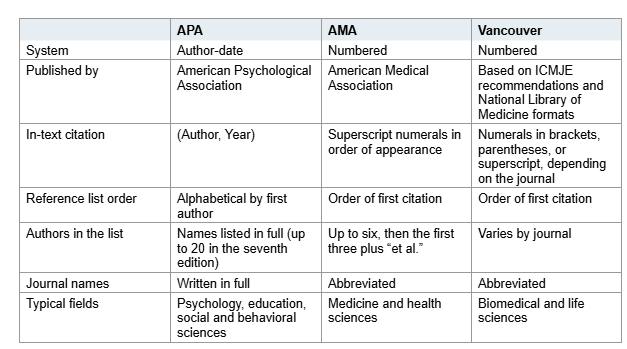
You cite a dataset the same way you cite a book — author, year, title, version, publisher, identifier. You cite a GitHub repository the same way, except you add a commit hash or release tag instead of a page number. You cite software the same way again, but you include a bracketed label like [Computer software] so the reader knows it’s not a paper. The core elements never change; only the order and punctuation do.
That’s the whole answer. Everything below is just the details each style adds.
Why Datasets, Code, and Software Belong in Your Bibliography
Citing digital research resources gives credit to the people who produced them and lets readers find the exact material your work depends on. A finding is only reproducible if someone can locate the same dataset, the same repository, and the same software version you used. That’s why both the Joint Declaration of Data Citation Principles (2014) and the Software Citation Principles (2016) require these items in the reference list — not as a methods footnote or an acknowledgement.
Major journals already enforce this. Nature, PNAS, the Journal of Open Source Software, and Bioinformatics all require software and dataset citations as formal references. If your professor asks you to cite a dataset or code, they’re not being picky — they’re following a standard that’s already mandatory at the publication level. If you’ve written about AI tools before, think of this the same way: citing AI-generated content is about giving proper attribution to the source you drew from.
What Every Citation Needs (The Universal Elements)
A complete citation for any digital resource requires six pieces of information. No matter which style you use, you need:
- Author — person, research group, company, or consortium
- Title — name of the dataset, repository, or software
- Version — version number, release tag, or commit hash
- Year — year the version was released
- Publisher / Repository — where it lives (Zenodo, GitHub, CRAN, etc.)
- Identifier — DOI preferred; URL only as a fallback
The version is the most frequently omitted but most important piece. pandas 1.5.3 and pandas 2.1.0 behave differently in edge cases. Anyone who wants to reproduce your analysis has to know the exact version you used — not whatever your package manager happens to install today. If your result depends on the software version, the software is a source.
Here’s the tradeoff most students don’t think about: DOI vs URL. A DOI is persistent and versioned. A raw URL can break, change, or get deleted. Always prefer a DOI from Zenodo, Figshare, or a data repository. Use a URL only when no DOI exists — and verify it actually works (like this guide shows).
Chicago 18 Watch-For Note
Chicago 18 was released in September 2024 and changed a few things: up to 6 authors in the bibliography (was 10), up to 2 in notes (was 3), ibid. retired in favor of three shortened citation forms, and the publisher city removed from entries. If your department still uses Chicago 17 via an outdated Turabian 9th edition, watch for those differences. Annotated bibliographies in MLA and Chicago cover both styles side by side.
Citing a Dataset
In APA 7, a dataset citation looks like this:
Okafor, C. N., & Lindqvist, M. (2025). Hourly river temperature measurements, Upper Tana basin, 2019–2024 (Version 2) [Data set]. Example Data Repository. https://doi.org/10.5555/hydro.2025.017
The same pattern applies to every style — author, year, title, version, repository, identifier. The only differences are punctuation and order.
Cite the version you used. Datasets are corrected and extended. Version 2 may not reproduce results from version 1.
Cite the dataset, not only the paper. If you used the data, cite the dataset; if you also relied on the analysis, cite the paper too. Both belong in the bibliography.
Use the dataset’s own identifier. A data DOI or record URL, not the DOI of the article that describes it. DataCite, which registers most data DOIs, requires creator, year, title, version, publisher, resource type, and identifier.
Citing a GitHub Repository
GitHub repos don’t have an inherent citation style — you apply any citation style to them with two key differences:
- Use a commit hash or release tag instead of “main.” The
main branch keeps changing. A commit hash like 7a3f9b2 fixes the exact state you used.
- GitHub is not the publisher. The author is whoever wrote the code. GitHub is the hosting service and belongs in the URL at most.
When a GitHub repo has a Zenodo DOI (which it often does, with one click), use the DOI instead of the URL:
Nguyen, T. (2024). thesis-preprocessing-pipeline (Version 1.2.0) [Computer software]. Zenodo. https://doi.org/10.5281/zenodo.10123456
If no DOI exists, include the commit hash and the repository URL:
Nguyen, T. (2024). thesis-preprocessing-pipeline (Commit 7a3f9b2) [Computer software]. GitHub. https://github.com/tnguyen/thesis-preprocessing-pipeline
If you haven’t used a reference manager yet, now’s the time — tools like Zotero and Mendeley save records directly from repository pages by reading citation metadata. Just check the item type after saving; a dataset saved as a web page will be formatted wrong in your bibliography. Here’s a guide to the best reference management tools if you need help choosing.
Citing Software
Software citations follow the same skeleton. The main difference across styles is whether they require a bracketed label — APA 7 requires [Computer software], Vancouver uses [Computer software] too, and MLA and Chicago don’t require one.
Bates, D., Mächler, M., Bolker, B., & Walker, S. (2024). lme4: Linear Mixed-Effects Models Using Eigen and S4 (Version 1.1-35) [R package]. CRAN. https://CRAN.R-project.org/package=lme4
The [R package] or [Computer software] label tells readers the resource type at a glance. Don’t skip it — it’s required by APA 7 and strongly recommended by Vancouver.
- R: Run
citation("packagename") in the console. It prints the formatted reference plus a BibTeX snippet. The package metadata is authoritative — unlike whatever the GitHub page says.
- Python: Check for a
CITATION.cff file in the repository. Many Python packages ship one. GitHub automatically renders a “Cite this repository” button when a repo contains a CITATION.cff file.
- CRAN / PyPI / Conda: The project landing page lists authors and the current version.
- Zenodo / Figshare: Many research packages have a DOI there with an official citation recommendation.
Citation Format Comparison Matrix
This is the single most useful reference you’ll ever keep for citing digital resources. Every cell contains a complete, real citation example — just swap the placeholder name with the one from your source.
| Style |
Dataset |
GitHub Repository |
Software |
| APA 7 |
Okafor, C. N., & Lindqvist, M. (2025). Hourly river temperature measurements, Upper Tana basin, 2019–2024 (Version 2) [Data set]. Example Data Repository. https://doi.org/10.5555/hydro.2025.017 |
Nguyen, T. (2024). thesis-preprocessing-pipeline (Commit 7a3f9b2) [Computer software]. GitHub. https://github.com/tnguyen/thesis-preprocessing-pipeline |
Bates, D., Mächler, M., Bolker, B., & Walker, S. (2024). lme4: Linear Mixed-Effects Models Using Eigen and S4 (Version 1.1-35) [R package]. CRAN. https://CRAN.R-project.org/package=lme4 |
| MLA 9 |
Okafor, Chidinma N., and Maja Lindqvist. Hourly River Temperature Measurements, Upper Tana Basin, 2019–2024. Version 2, Example Data Repository, 2025. |
Nguyen, Thi. thesis-preprocessing-pipeline. Version 1.2.0, GitHub, 2024, github.com/tnguyen/thesis-preprocessing-pipeline. Commit 7a3f9b2. |
Bates, Douglas, et al. lme4: Linear Mixed-Effects Models Using Eigen and S4. Version 1.1-35, CRAN, 2024, cran.r-project.org/package=lme4. |
| Chicago 17/18 |
Okafor, Chidinma N., and Maja Lindqvist. 2025. Hourly River Temperature Measurements, Upper Tana Basin, 2019–2024. Version 2. Example Data Repository. https://doi.org/10.5555/hydro.2025.017 |
Nguyen, Thi. 2024. thesis-preprocessing-pipeline. Commit 7a3f9b2. Accessed July 12, 2026. GitHub. |
Bates, Douglas, Martin Mächler, Ben Bolker, and Steve Walker. 2024. lme4: Linear Mixed-Effects Models Using Eigen and S4. Version 1.1-35. CRAN. https://CRAN.R-project.org/package=lme4 |
| Vancouver |
Okafor C, Lindqvist M. Hourly river temperature measurements, Upper Tana basin, 2019–2024 (Version 2) [Data set]. Example Data Repository; 2025 [cited 2026 Nov 12]. Available from: https://doi.org/10.5555/hydro.2025.017 |
Nguyen T. thesis-preprocessing-pipeline (Commit 7a3f9b2) [Computer software]. GitHub; 2024 [cited 2026 Nov 12]. Available from: https://github.com/tnguyen/thesis-preprocessing-pipeline |
Bates D, Mächler M, Bolker B, Walker S. lme4: Linear Mixed-Effects Models Using Eigen and S4 (Version 1.1-35) [R package]. CRAN; 2024 [cited 2026 Nov 12]. Available from: https://CRAN.R-project.org/package=lme4 |
The pattern is consistent across all four styles. What changes is punctuation, element order, and whether a bracketed label appears. Screenshot or print this table. You’ll use it more than any other single reference in your academic writing career.
How to Get a DOI for Your GitHub Repository
If you maintain your own research code and want a citable identifier, the Zenodo + GitHub integration is the easiest path. It’s free, one-click, and automatic:
- Log in to Zenodo (zenodo.org) with your GitHub account
- Go to Zenodo’s GitHub integration settings and toggle the repo on
- Create a GitHub release — Zenodo snapshots it and assigns a DOI
Every release gets both a version DOI and a concept DOI. Pin the version DOI in your README. If you publish an R package, CRAN auto-generates a citation. If you publish a Python package, PyPI does not issue DOIs — use Zenodo via GitHub for the citable archive.
For the full setup walkthrough, GitHub’s own documentation explains it step by step: Referencing and citing content.
Authoritative Ways to Find Citations
Several tools generate the correct citation for you automatically:
CITATION.cff files — GitHub automatically renders a “Cite this repository” button when a repository contains a CITATION.cff file. It’s becoming the norm for research software.- R’s
citation("packagename") — prints both APA and BibTeX citations directly from the package metadata. It’s authoritative because it comes from the package maintainer.
- Reference managers — Zotero and Mendeley read citation metadata directly from repository pages. Just verify the item type after saving; datasets saved as web pages get formatted wrong. See this guide to choose the right tool.
- Style-specific walkthroughs — Life of Research covers APA 7 in detail, Acurio covers APA 7, MLA 9, and Chicago with examples, and CiteMe provides templates for all major styles.
Common Student Mistakes (and How to Avoid Them)
Even experienced students make these citation errors. Here are six common ones:
- Citing the describing paper instead of the software/dataset itself. If you used
lme4 and cite the Bates et al. paper describing the method, you’ve cited the method but not the software. Both belong in the bibliography if you used both. This is one of the most common mistakes — see 10 common academic writing mistakes for more.
- Omitting the version. “numpy” and “numpy 2.1.0” are not the same reference. Without a version, the citation is useless for reproduction.
- Using GitHub as the publisher. GitHub is the hosting service, not the publisher. The author is whoever wrote the code.
- Writing the DOI as
doi:10… instead of https://doi.org/…. Always use the full URL. Most style guides now require it.
- Missing the
[Computer software] or [Data set] bracket. APA 7 requires it. Vancouver requires it. Chicago and MLA recommend it.
Quick Checklist
Before you hit submit, verify every citation against these items:
- [ ] Author name (person, group, or company — not GitHub)
- [ ] Full title
- [ ] Version number, release tag, or commit hash
- [ ] Year of release
- [ ] Repository or publisher name
- [ ] DOI URL or full project URL
- [ ] Bracketed label
[Computer software] or [Data set] if using APA or Vancouver
- [ ] DOI is a working link
Bottom Line
Always prefer a DOI over a raw URL. If your GitHub repo doesn’t have one, set up the Zenodo integration — it takes three clicks and gives your code a permanent, citable identifier. Use CITATION.cff files and R’s citation() command to find authoritative citations automatically. And never, ever cite the paper that describes the software instead of the software itself. Your references should reflect exactly what you used.
If you’re working with APA 7, this setup guide walks through the reference list format step by step.