Your reference list looks good. The formatting is consistent. You hit every APA 7th edition rule in the APA reference list setup guide. Then you get an email: the journal uses Vancouver style, not APA.
Your heart drops. Alphabetical order. Author-date citations. Journal titles in italics. Every single reference needs to be restructured, re-numbered, and re-checked.
This is exactly what happens during an APA to Vancouver conversion after a journal submission. It’s not a rejection of your research — it’s a formatting requirement, and the fix is entirely mechanical.
This guide walks you through the actual conversion process step by step, using real examples. No guessing. Just the rules, the patterns, and the pitfalls to avoid.
When You Need to Convert from APA to Vancouver
You’ve written a paper using APA style because that’s what your discipline teaches (psychology, education, social sciences). Then you submit to a journal, and their guidelines say “Vancouver style required.”
This happens for two reasons:
- Journal discipline mismatch. Many biomedical and life sciences journals use Vancouver style. If your research intersects with health sciences, public health, or clinical research, those journals are where it lands.
- Professor or department requirement. Some departments switch citation styles between coursework and thesis requirements without warning students in advance.
The conversion is procedural. You’re not changing your citations’ content — just their format. You can do it yourself, even if you’ve never seen a Vancouver reference before.
APA vs Vancouver: Key Differences at a Glance
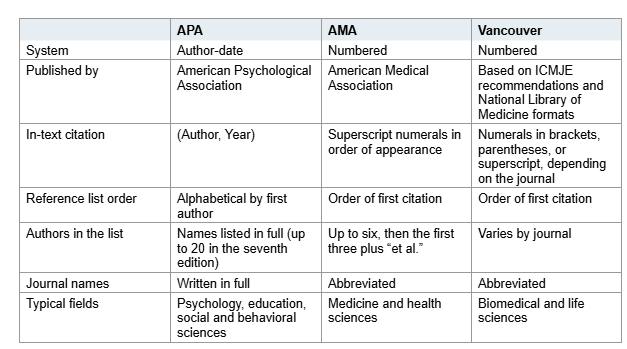
The two systems look completely different once you know the patterns.
| Feature |
APA Style |
Vancouver Style |
| Citation format |
Author-date (Smith, 2023) |
Numbered superscript or bracketed (1, or [1]) |
| Reference list order |
Alphabetical by author |
Sequential by first appearance |
| Author name |
Surname, Initials. (Smith, J. A.) |
Surname Initials no periods (Smith JA) |
| Author limit |
5+ authors → “et al.” |
6+ authors → “et al.” (varies) |
| Journal title |
Full title, italicized |
NLM abbreviation, no italics |
| Year placement |
After authors |
After journal, semicolon separator |
| DOI format |
https://doi.org/xxxxx |
Journal-specific |
| In-text punctuation |
In parentheses |
Before or after period — journal-dependent |
The table above comes from AJE’s citation style comparison, which covers the structural differences with concrete examples. It’s the fastest way to see what changes and what doesn’t.
Step-by-Step Conversion Workflow: How to Convert References Vancouver Style
Follow these steps in order. You won’t miss anything.
Step 1: Reorder the Reference List
Go through your paper top to bottom. Note each reference the first time it appears. Build a numbered list in that order.
Bottom line: Number 1 is the first source cited in the text. Number 2 is the second. Not alphabetical.
Step 2: Reform Authors’ Names
APA uses a comma after the surname and periods between initials. Vancouver strips both.
- APA: Smith, J. A., Johnson, B. K., & Williams, C. R.
- Vancouver: Smith JA, Johnson BK, Williams CR.
Key rules:
- Surname first, then initials — no spaces, no periods
- Comma between authors (not “and” or “&”)
- Period at the end of the last author only
Step 3: Abbreviate Journal Names
Vancouver uses standard abbreviations. APA uses full journal titles.
Find the correct abbreviation in the NLM Catalog at https://www.ncbi.nlm.nih.gov/nlmcatalog/journals. Don’t abbreviate yourself — this is the single most common error students make.
| Full Title |
NLM Abbreviation |
| American Journal of Public Health |
Am J Public Health |
| New England Journal of Medicine |
N Engl J Med |
| Journal of the American Medical Association |
JAMA |
The UofT Vancouver Style Guide confirms: “To find the journal title abbreviation, go to Medline’s Journals Database and search by journal title.”
Step 4: Rearrange Year, Volume, and Pages
In Vancouver, the year appears after the journal title, separated by a semicolon.
Author AA, Author BB. Title. Abbreviated Journal. Year;volume(issue):pages.
The semicolon marks where year ends and volume begins. A colon separates the volume(issue) from the page range.
Step 5: Check DOI Formatting
DOI formatting isn’t uniform across Vancouver-style journals. Some want doi:10.xxxx, some want https://doi.org/10.xxxx, and some omit DOIs entirely.
Always check the journal’s instructions. If they don’t specify, doi:10.xxxx is the safest default.
Step 6: Re-number In-Text Citations
Every in-text citation needs a matching number. Replace (Smith, 2023) with Smith (1) or just (1), depending on what the journal requires.
Some journals place citation numbers before the period. Others place them after. Consistency is required — don’t mix styles.
Before and After: A Real Reference Converted
Here’s exactly what happens when you convert a single reference from APA to Vancouver format.
| Field |
APA Format |
Vancouver Format |
Annotation |
| Authors |
Smith, J. A., Johnson, B. K., & Williams, C. R. |
Smith JA, Johnson BK, Williams CR. |
Periods, spaces, commas, “&” all removed. Period only at end. |
| Year |
(2023) |
2023; |
Moved after journal title. Semicolon added. |
| Journal |
American Journal of Public Health |
Am J Public Health. |
NLM abbreviation. No italics. Period added. |
| Volume/Pages |
113(4), 567-575. |
2023;113(4):567-75. |
Year inserted. Semicolon and colon separators. Page range shortened. |
| DOI |
https://doi.org/10.2105/AJPH.2023.000456 |
doi:10.2105/AJPH.2023.000456 |
Prefix removed. Some journals want https://, others doi:. Check guidelines. |
APA: Smith, J. A., Johnson, B. K., & Williams, C. R. (2023). Trends in adolescent mental health service utilization. American Journal of Public Health, 113(4), 567-575. https://doi.org/10.2105/AJPH.2023.000456
Vancouver: Smith JA, Johnson BK, Williams CR. Trends in adolescent mental health service utilization. Am J Public Health. 2023;113(4):567-75. doi:10.2105/AJPH.2023.000456
You can follow this table as a template for your own references.
Common Mistakes When Converting to Vancouver
These errors trip up most students.
Wrong Author Format
Using periods between initials or keeping the comma after the surname is the most frequent mistake. Vancouver strips both. The correct format is Smith JA — no punctuation, no space.
Arbitrary Journal Abbreviations
Abbreviating journal names yourself produces incorrect results. Use the NLM Catalog. If a journal isn’t listed there, abbreviate according to the style used for similar titles. Don’t guess.
Mismatched Citation Numbers
If a reference number appears in the text but not in the reference list (or vice versa), production will flag it. Formatting errors won’t trigger plagiarism checks, but poorly formatted references can erode reader trust — the same way fake references undermine a thesis.
Inconsistent Number Placement
Some journals place citation numbers before the period. Others place them after. If you mix them across your paper, the journal will send it back. Pick one and stick with it.
Forgetting “et al.” Differences
APA uses “et al.” starting at the third author in in-text citations. Vancouver typically lists up to six authors before “et al.” — and some journals require all authors named. Check the journal’s guidelines.
Using Reference Managers to Convert (Zotero, Mendeley, EndNote)
Reference managers automate most of this work. If you’ve been using one, switching citation styles is built into the tool.
Zotero supports over 9,000 citation styles including Vancouver. Switch the style in one click: go to Citation Style settings and select “Vancouver”. The bibliography reformats automatically. Read our Zotero guide for the full workflow.
Mendeley handles style changes similarly. Their official guide shows you how to switch styles even after creating a bibliography. Mendeley Cite displays a preview of the new style before applying it — useful for catching errors.
The critical caveat: reference managers are fast, but not perfect. They miss journal-specific quirks — DOI formatting, author limits, punctuation variations. Always audit the output manually against the journal’s instructions.
If you haven’t used a reference manager yet, start with tools like Zotero. They store references once and format them in any style, making future conversions painless.
What to Do If the Journal Has Specific Vancouver Rules
“Vancouver style” is not one standard. It’s a family of closely related formats. AJE’s citation style comparison explicitly warns that journals adopting Vancouver may still require their own punctuation, in-text numbering, or author limits.
This means:
- Some journals list all authors regardless of how many.
- Some journals prefer DOI URLs (
https://doi.org/) over doi: prefixes.
- Some journals use square brackets
[1] for in-text numbers instead of superscripts.
Always check the journal’s “Instructions for Authors” page. The Vancouver style guide covers the base rules, but journal-specific variants always take precedence.
Quick Summary and Next Steps
Converting from APA to Vancouver is mechanical, not conceptual. You’re rearranging patterns, not rethinking your research.
- Check the journal’s guidelines for Vancouver-specific rules before starting.
- Reorder references by first appearance in the text, not alphabetically.
- Reformat authors — remove periods, spaces, commas, and “&”.
- Abbreviate journals using the NLM Catalog (https://www.ncbi.nlm.nih.gov/nlmcatalog/journals).
- Rearrange year, volume, issue, and pages using semicolons and colons.
- Check DOI formatting against journal requirements.
- Re-number in-text citations sequentially and verify every match.
- Audit the output manually — reference managers miss journal-specific quirks.
The biggest mistake students make is rushing through the conversion and assuming “Vancouver” means one thing. It doesn’t. Your journal’s instructions are the only rules that matter.
If your reference list is properly formatted and your citations match, you’ll pass the formatting check on the first resubmission. The content hasn’t changed — only the labels. That’s the part you can control.